
• Zur Hauptnavigation springen
  • Skip to main content
  • Zur Hauptsidebar springen
  • Zur Fußzeile springen
Logo

CITROWEB Webdesign

Erste Wahl für Ihren Onlineauftritt

  • Home
  • Leistungen
    • Webdesign, Webentwicklung und Beratung
    • Online-Shops mit WooCommerce
    • Technische Unterstützung für WooCommerce-Shops
    • Suchmaschinenmarketing
      • SEO: Ihr Webauftritt erhält mehr relevante Besucher
      • SEA: Suchmaschinenwerbung für Ihren Webauftritt
    • Webhosting
  • Blog
  • Kontakt aufnehmen

Blog

Unterstützung für Retina @2x version bei Header-Image-Logo im Genesis Framework

23. August 2022

Genesis nutzt das WordPress-Feature um ein Logo im Header zu setzen, anstatt des Titels und der Beschreibung. Allerdings wird die Bildgröße beim Logo auf die tatsächlichen Pixel festgelegt.

Um die doppelte Pixeldichte bei Retina (iPhone) zu unterstützen muss das Logobild die doppelte Pixelgröße haben. Über die CSS-Property background-size wird dann die normale width und height des Logos festgelegt.

Um das im Genesis-Framework umzusetzen gehst Du wie folgt vor:

  1. Standardfunktionalität überschreiben mit
add_theme_support( 'custom-header', array(
	'header_image' => '',
	'header-selector' => '.site-title a',
	'header-text' => false,
	'height' => 150,
	'width' => 500,
) );

Das lässt sich entweder über die functions.php (nur bei eigenem Theme welches man selbst weiterentwickelt!) oder z.B. über das Plugin My Custom Functions erweitern.

2. height und width aus dem Beispiel oben muss durch die zweifache Größe des eigentlichen Logos ersetzt werden. Also in diesem Beispiel hat das Logo die Abmessungen 250×75.

3. Im eigenen CSS ergänzen:

/* replace width and height with actual size, it means half the size you used above in theme support for custom-header */
.header-image .site-title > a {
    background-size: <width>px <height>px;
}

Danke an Anything graphic (https://anythinggraphic.net/override-header-image-logo-genesis-wordpress-retina-2x-version/)
Kategorie: Genesis-Framework, Mobile, WordPress

„Danke für dein Vertrauen in WordPress“ vom unteren Rand des Dashboards entfernen

12. August 2022

Mit folgendem Code lässt sich der Text vom Dashboard entfernen:

function cwhf_remove_wp_footer_admin()
{
    add_filter( 'admin_footer_text',    '__return_false', 11 );
}
add_action( 'admin_init', 'cwhf_remove_wp_footer_admin' );

Statt einem leeren Text lässt sich hier auch ein eigener Text setzen.

WordPress-Version vom unteren Rand des Dashboards entfernen

Die Version lässt sich so entfernen:

function cwhf_remove_version_wp_footer_admin()
{
    add_filter( 'update_footer',        '__return_false', 11 );
}
add_action( 'admin_init', 'cwhf_remove_version_wp_footer_admin' );

Um beides auszublenden kombiniert man idealerweise beide Filter-Aufrufe:

function cwhf_remove_wp_footer_admin()
{
    add_filter( 'admin_footer_text',    '__return_false', 11 );
    add_filter( 'update_footer',        '__return_false', 11 );
}
add_action( 'admin_init', 'cwhf_remove_wp_footer_admin' );

Kategorie: Entwicklung, WordPress

Remove „Thank you for your trust in WordPress“ from the bottom of the dashboard

12. August 2022

The following code can be used to remove the text from the dashboard:

function cwhf_remove_wp_footer_admin()
{
    add_filter( 'admin_footer_text',    '__return_false', 11 );
}
add_action( 'admin_init', 'cwhf_remove_wp_footer_admin' );

Instead of an empty text, you can also set your own text here.

Remove WordPress version from the bottom of the dashboard

The version can be removed in this way:

function cwhf_remove_version_wp_footer_admin()
{
    add_filter( 'update_footer',        '__return_false', 11 );
}
add_action( 'admin_init', 'cwhf_remove_version_wp_footer_admin' );

To hide both, you should ideally combine both filter calls:

function cwhf_remove_wp_footer_admin()
{
    add_filter( 'admin_footer_text',    '__return_false', 11 );
    add_filter( 'update_footer',        '__return_false', 11 );
}
add_action( 'admin_init', 'cwhf_remove_wp_footer_admin' );

Kategorie: development, WordPress

WordPress-Logo aus der Toolbar entfernen

9. August 2022

Standardmäßig zeigt WordPress oben links in der Toolbar (sog. Adminbar) das eigene Logo an. Möchte man es entfernen so geht dies entweder mit dem Plugin Remove WP Branding oder programmatisch auf diesem Weg:

function cwhf_remove_logo_wp_toolbar() {
        global $wp_admin_bar;
        $wp_admin_bar->remove_menu( 'wp-logo' );
}
add_action( 'wp_before_admin_bar_render', 'cwhf_remove_logo_wp_toolbar', 0 );

WordPress-Logo in der Toolbar ändern

Soll stattdessen ein anderes Logo angezeigt werden so funktioniert dies mit folgendem Code:

function cwhf_replace_logo_in_admin_bar() {
echo '
<style type="text/css">
#wpadminbar #wp-admin-bar-wp-logo > .ab-item .ab-icon:before {
background-image: url("https://my-domain.com/wp-content/uploads/my-favicon.png") !important;
background-position: 0 0;
color:rgba(0, 0, 0, 0);
}
#wpadminbar #wp-admin-bar-wp-logo.hover > .ab-item .ab-icon {
background-position: 0 0;
}
</style>
';
}
add_action('wp_before_admin_bar_render', 'cwhf_replace_logo_in_admin_bar');

Kategorie: Entwicklung, WordPress

Remove WordPress logo from toolbar

9. August 2022

By default, WordPress displays its own logo in the top left corner of the toolbar (so-called adminbar). If you want to remove it, you can do so either with the plugin Remove WP Branding or programmatically in this way:

function cwhf_remove_logo_wp_toolbar() {
        global $wp_admin_bar;
        $wp_admin_bar->remove_menu( 'wp-logo' );
}
add_action( 'wp_before_admin_bar_render', 'cwhf_remove_logo_wp_toolbar', 0 );

Change WordPress logo in toolbar

If you want to display a different logo instead, use the following code:

function cwhf_replace_logo_in_admin_bar() {
echo '
<style type="text/css">
#wpadminbar #wp-admin-bar-wp-logo > .ab-item .ab-icon:before {
background-image: url("https://my-domain.com/wp-content/uploads/my-favicon.png") !important;
background-position: 0 0;
color:rgba(0, 0, 0, 0);
}
#wpadminbar #wp-admin-bar-wp-logo.hover > .ab-item .ab-icon {
background-position: 0 0;
}
</style>
';
}
add_action('wp_before_admin_bar_render', 'cwhf_replace_logo_in_admin_bar');

Kategorie: development, WordPress

Change login cookie lifetime in WordPress

19. Juli 2022

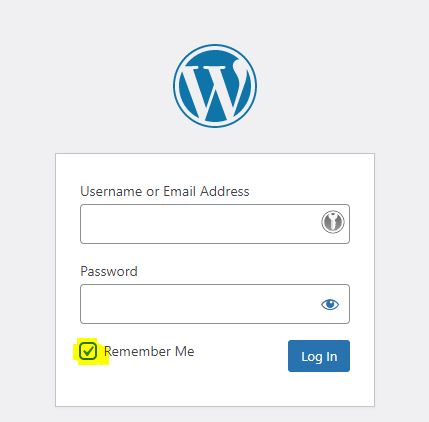
"Stay logged in" at WordPress login

If you check „Stay logged in“ when you log in (see image), WordPress will allow you to work longer in the WordPress backend without having to log in again.

If this checkmark is set, the lifetime of the authentication cookie is increased. However, the time is only extended by about half a month. If you want to stay logged in longer, for example because you want to work with WordPress every day, the following solution is available:

add_filter( 'auth_cookie_expiration', 'cwhf_extend_auth_cookie_to_1_year' );
function cwhf_extend_auth_cookie_to_1_year( $expirein ) {
	return 31556926; // 1 year in seconds
}

The above code must be added to the WordPress code. This is done via the Code Snippets plugin, the functions.php or a

Kategorie: development, WordPress

  • « Go to Previous Page
  • Seite 1
  • Interim pages omitted …
  • Seite 4
  • Seite 5
  • Seite 6
  • Seite 7
  • Seite 8
  • Interim pages omitted …
  • Seite 16
  • Go to Next Page »

Haupt-Sidebar

  • How to remove dashicons in WordPress frontend?
  • How do I create a website (homepage) with ChatGPT?
  • Can I create a website (homepage) with ChatGPT?
  • iOS restrictions re: bringing up the keyboard on programmatic focus
  • iOS restrictions re: bringing up the keyboard on programmatic focus
  • Remove user listing from WP-JSON
  • Benutzerauflistung aus WP-JSON entfernen
  • What does „Video is not the main content of the page“ mean?
  • Was hat es mit „Das Video ist nicht der Hauptinhalt der Seite“ auf sich?
  • Remove WordPress logo from toolbar
  • Efficient onboarding simplified: LearnSuite – the cloud application for digital onboarding
  • Wir stellen vor: LearnSuite – Die Cloudanwendung für digitales Onboarding
  • Howto: How do I create a website (homepage) with ChatGPT?
  • Howto: Wie erstelle ich mit ChatGPT eine Website (Homepage)?
  • Can I create a website (homepage) with ChatGPT?
  • Kann ich mit ChatGPT eine Website (Homepage) erstellen?
  • Set noindex nofollow via .htaccess HTTP header
  • Über .htaccess X-Robots-Tag noindex nofollow setzen
  • How to remove WordPress Dashicons in frontend?
  • Wie lassen sich Dashicons im WordPress-Frontend entfernen?
  • DSGVO (3)
  • GDPR (3)
  • Genesis Framework (10)
  • Genesis-Framework (9)
  • Google Search Console (4)
  • Google Search Console (4)
  • Linux (3)
  • Linux (3)
  • mobile (3)
  • Mobile (3)
  • Network (1)
  • Netzwerk (1)
  • SEO (5)
  • SEO (5)
  • Trends (3)
  • Trends (4)
  • Uncategorized (3)
  • Web development (1)
  • Web hosting (1)
  • Webentwicklung (1)
  • Webhosting (1)
  • WooCommerce (9)
  • WooCommerce (9)
  • WordPress (24)
  • WordPress (23)

Footer

Logo


© 2026 CITROWEB
  • Datenschutz
  • Impressum