
• Zur Hauptnavigation springen
  • Skip to main content
  • Zur Hauptsidebar springen
  • Zur Fußzeile springen
Logo

CITROWEB Webdesign

Erste Wahl für Ihren Onlineauftritt

  • Home
  • Leistungen
    • Webdesign, Webentwicklung und Beratung
    • Online-Shops mit WooCommerce
    • Technische Unterstützung für WooCommerce-Shops
    • Suchmaschinenmarketing
      • SEO: Ihr Webauftritt erhält mehr relevante Besucher
      • SEA: Suchmaschinenwerbung für Ihren Webauftritt
    • Webhosting
  • Blog
  • Kontakt aufnehmen

Blog

WooCommerce product page without tabs, but everything below each other

22. Dezember 2021

It is about these tabs that are displayed on the product page

To remove the tabs (description, additional information and ratings) on the product page in WooCommerce or to place all information below each other we use the following short code snippet.

By default, WooCommerce displays separate tabs for Description, Additional Information and Reviews on the product page. Sometimes it makes sense to do without tabs for usability reasons. Amazon and other big store also show the content below each other instead of in tabs. The approach comes from the mobile sector and we have become very accustomed to it by now. It’s not wrong to take a cue from the big ones, as they’ve often already put a lot into optimizing their presences and potential visitors have already gotten used to it.

function woocommerce_output_product_data_tabs() {
	$product_tabs = apply_filters( 'woocommerce_product_tabs', array() );
	
	if ( empty( $product_tabs ) ) return;
	
	echo '<div class="woocommerce-tabs wc-tabs-wrapper">';
	foreach ( $product_tabs as $key => $product_tab ) {
		echo '<div id="tab-' . esc_attr( $key ) . '">';
		if ( isset( $product_tab['callback'] ) ) {
			call_user_func( $product_tab['callback'], $key, $product_tab );
		}
		echo '</div>';
	}
	echo '</div>';
}
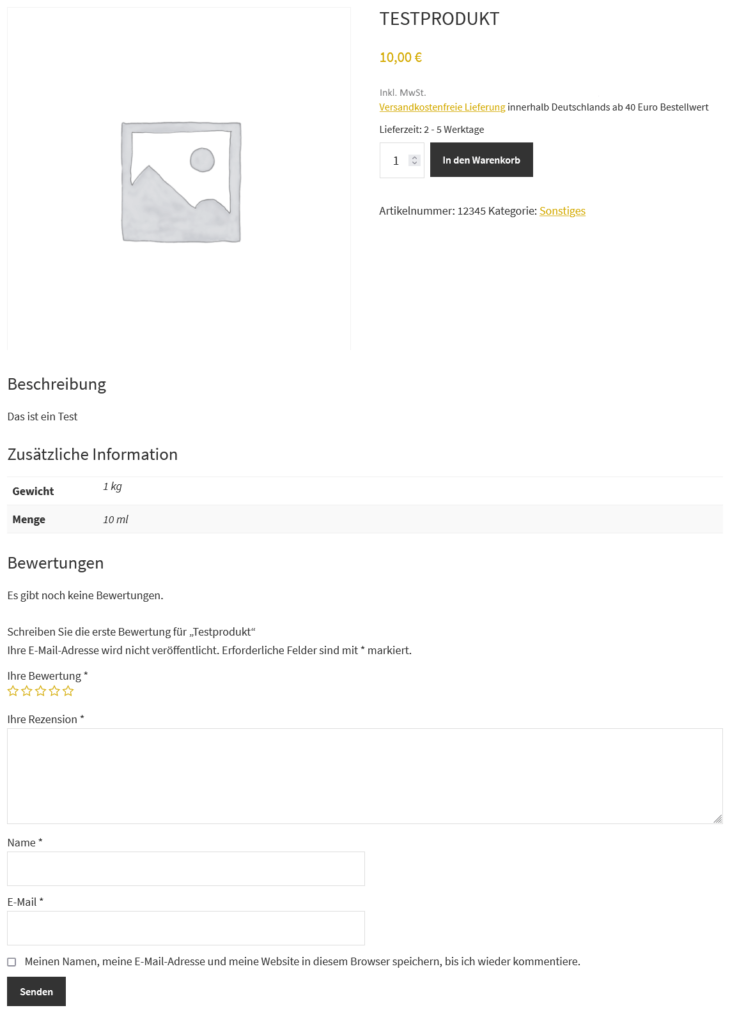
Tabs on the product page in Woocommerce among themselves

As seen here in the example, all information is below each other and the tab bar (as shown above) is not visible.

This provides the visitor with an overview of all information at a glance.

Which do you like better with tabs or one below the other?

Alternative solution

Alternatively, there is still this solution at gist.github.com. This has the disadvantage that the empty DIVs are displayed anyway, even if there is no content. Of course, this can be solved in the code. With the above solution, tab content is only included when it is available.
Kategorie: development, WordPress

Solution for Google Search Console – Warning: „brand“ field is missing

22. Dezember 2021

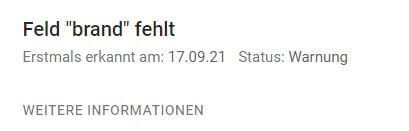
Field "brand" missing

If you run a store with WooCommerce, you have surely already discovered the adjacent message in Google Search Console under Improvements -> Products.

Standardmäßig fügt das WooCommerce-Plugin für WordPress das „Brand“-Schema nicht zu WooCommerce Produktseiten hinzu. Das bedeutet, dass es eine Lücke im WooCommerce-Schema gibt.

On various support threads on WordPress.org and Github it says this can be solved by purchasing a WooCommerce plugin. With something as basic as this, you can rightly get very frustrated.

Ultimately, WooCommerce’s justification is that these are not essential parts of Schema – they only generate warnings in Google Search Console, but not errors. So, theoretically, they are not a big deal.

However, if you want to close this gap, you have several options. There are „scheme plugins“ that will help you patch this up – the Yoast SEO WooCommerce plugin fills in the gaps for you – but it’s a bit overkill to spend around 70 euros a year on it. Unless you have or need it for some other important reason. Then this guide will help.

Many people avoid code-based solutions because they need to be „maintained“ and break regularly. So for an e-commerce website that you make money with, that’s not so great!

Code to fix Google Search Console – warning for „brand“ field

The Code Snippets plugin allows you to integrate small code snippets like the following into the page. Professionals have a separate plugin for such customizations or use the functions.php of their theme.

/*
* Füge "Brand"-Schema in die Strukturierten Daten ein
*/
function custom_woocommerce_structured_data_product ($data) {
	global $product;
	$data['brand'] = ['@type' => 'Brand', 'name' => 'Meine Marke'];
	return $data;
}
add_filter( 'woocommerce_structured_data_product', 'custom_woocommerce_structured_data_product' );

If you are the manufacturer of your products or if you only carry goods of one brand, you can insert your brand here instead of„My brand“ (quotation marks must remain).

Alternatively, the brand can be read from the brand property using $product->get_attribute(‚pa_brand‘).

The code snippet would look like this:

/*
* Füge "Brand"-Schema in die Strukturierten Daten ein
*/
function custom_woocommerce_structured_data_product ($data) {
	global $product;
        $data['brand'] = ['@type' => 'Brand', 'name' => $product->get_attribute('pa_brand') ?? null];
	return $data;
}
add_filter( 'woocommerce_structured_data_product', 'custom_woocommerce_structured_data_product' );

I use a product property Manufacturer with a customer. Therefore, I set the „Brand“ field with the manufacturer using the $product->get_attribute(‚pa_manufacturer‘) command.

To test success, use Google’s handy online tool: Test Structured Data.

Kategorie: Google Search Console, SEO, WooCommerce

Enable block-based widget editor with Genesis >= 3.3.4

22. Dezember 2021

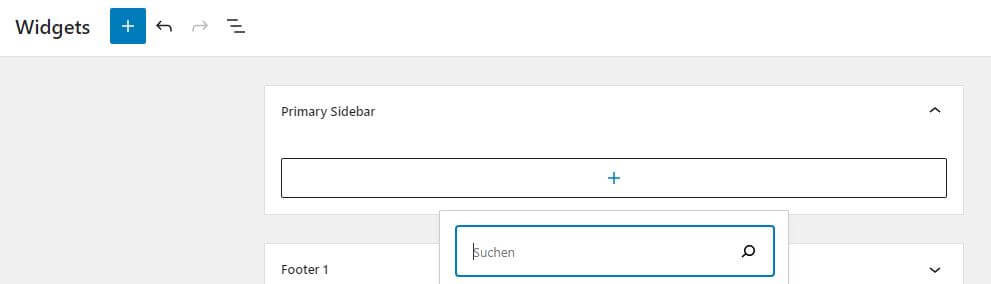
Widgets editor in WordPress
This is how the new widgets editor looks as of WordPress 5.8

With Genesis 3.3.4, StudioPress has implemented support for the new block-based widget editor. The new widget editor has been added with WordPress version 5.8.

But to use the function you have to add the following code in functions.php:

//* Enable the block-based widget editor
add_filter( 'use_widgets_block_editor', '__return_true' );

More information can be found here: https://my.studiopress.com/documentation/snippets/block-editor/enable-block-based-widget-editor/ (english)

Kategorie: Genesis Framework, WordPress

What is the meaning of ‚Schema „data-vocabulary.org“ obsolete‘?

22. Dezember 2021

Example SEO dashboard

Currently, Google is sending out alerts via Search Console „Navigation path issues detected on „.

With this, Google wants to point out that they focus on the schema schema.org in the development of the crawler and no longer support metadata from the obsolete namespace data-vocabulary.org.

Google made the switch on April 6, 2020. Since then, only the more widely used schema.org schema is supported by the search engine.

What is structured data such as schema.org?

Structured data are instructions to search engines about specific meaning of data and how it relates to other data.

Without becoming too theoretical: Data about a page can be passed along separately in this way. If it is an eShop, for example, the title, the item number, the price, etc. can be given to the search engine without the crawler itself having to read out the information in the text on the page. After all, the latter is not so easy. With prices this might be possible, but with part numbers the question is where is it and what does it look like. To solve exactly this problem, there is structured data (see also ontology at Wikipedia).

Do I have to do anything about it?

Exactly who receives the message is not entirely clear to me. Maybe they get all webmasters. If you got this message, it does not mean that you have an acute problem.

If the CMS / ESHOP or the SEO plugin you are using supports schema.org metadata, then you don’t need to do anything else. If it is a current version, this should be the case. The developers of an actively developed system usually know and develop the software according to the current standards.

To test structured data on your own data, Google offers the online tool to test structured data (external link). If data about products (in the case of an online store), such as titles, prices, etc., appear there, everything is fine.

WooCommerce in the current version supports schema.org schema. WordPress can be provided with structured data according to schema.org with the help of YOAST SEO, among others. More information can be found at YOAST under this link: Structured data with Schema.org: the ultimate guide (external link).

Want to learn more about the topic? Another article on this topic can be found at t3n.de (external link).

Kategorie: Google Search Console, SEO

Automatische Updates bei WordPress mit WP-CLI

20. Dezember 2021

WordPress bietet die Einstellung Updates von Core, Plugins und Themes automatisch durchführen zu lassen. Dazu werden die Updates zeitlich zufällig, auch tagsüber ausgeführt. Das führt zu Unterbrechungen im Betrieb der Homepage. Um die Updates zur festgelegten Zeit z.B. nachts durchzuführen, bietet sich WP-CLI an.

Ein weiterer Aspekt sind die Übersetzungsdateien (sog. translation files) von WordPress selbst und der Plugins und Themes, diese werden aktuell von WordPress nicht automatisch mitaktualisiert. Jeder kennt es, diese Updates müssen regelmäßig von Hand aus dem Dashboard ausgeführt werden. Das lässt sich ebenfalls mit WP-CLI automatisieren.

Unterlassen wir die Updates der sog. translation-Dateien, so laufen wir Gefahr, dass auf einer Seite, die nicht in Englisch läuft, Begriffe nicht übersetzt sind.

Cronjobs ("Geplante Aufgaben") in Plesk
Cronjobs („Geplante Aufgaben“) in Plesk

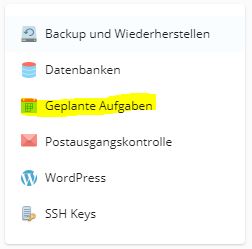
Um die Updates zu automatisieren, benötigen wir einen sog. Cronjob (bei Plesk wird es im Deutschen „Geplante Aufgaben“ genannt und befindet sich unter Websites & Domains im rechten Seitenmenü) mit dem wir WP-CLI auf unserer WordPress-Installation ausführen. Mit Cronjobs lassen sich zeitgesteuert Befehle ausführen oder URLs aufrufen. Auch lässt sich eine Mailbenachrichtigung bei jedem Aufruf oder im Fehlerfall einrichten. Die nachfolgenden Ausführungen beziehen sich auf ein Linux-Hosting welches in > 99% der Fall bei den meisten anzutreffen ist. Gehören Sie zu den wenigen, die ein Windows-Hosting haben, so müssen die Schritte etwas angepasst weden.

Damit WP-CLI genutzt werden kann, müssen wir es erst installieren. Dazu laden wir es herunter und legen WP-CLI im eigenen Webhosting bzw. Server ab. Das Paket enthält die ausführbare Datei „wp“. Die sollte jetzt im Filesystem im Webhosting abgelegt werden (dazu entweder FTP, SFTP oder den Dateimanager des Hostingpanels nutzen). Damit die Datei tatsächlich ausgeführt werden kann, benötigt sie ein Ausführungsrecht. Dazu mit dem Dateimanager oder FTP-Programm, die Ausführungsrechte setzen (siehe z.B. Plesk-Doku). Nun sind wir bereit die geplante Aufgabe anzulegen.

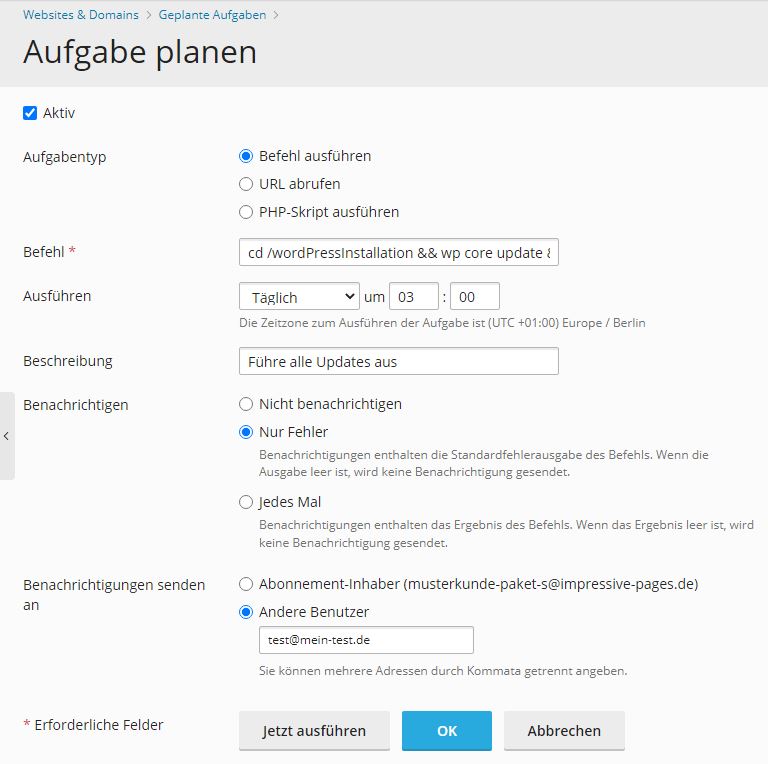
Geplante Aufgaben in Plesk anlegen

In Linux Commandline-Shells, in denen die Ausführung der Cronjobs stattfindet, gibt es die Möglichkeit Befehle zu verketten. Mit && werden Befehle verkettet und in der Reihenfolge von links nach rechts ausgeführt (z.B. Befehl1 && Befehl2 –MeinParameter usw.). Es lässt sich auch der Operator & statt && verwenden. Dann werden die nachfolgenden Befehle nur ausgeführt wenn der vorherige Befehl erfolgreich durchgelaufen ist. Macht in diesen Fall für unsere automatischen Updates aber keinen großen Unterschied welchen Operator wir verwenden.

Damit wirklich alles aktualisiert wird inkl. der Übersetzungsdateien verwenden wir folgenden Befehl:

cd /wordPressInstallation && wp core update && wp plugin update --all && wp theme update --all && wp language core update && wp language plugin update --all && wp language theme update --all

Zuerst wechseln wir mit cd /wordPressInstallation in das WordPress-Installationsverzeichnis (oft liegt die WordPress-Installation unter /httpdocs). Sind mehrere WordPress-Instanzen vorhanden, so kann für jede Seite eine geplante Aufgabe angelegt werden und die Schritte werden für jeden Auftritt wiederholt. Danach wird über wp core update das Update (bzw. Updateprüfung) von WordPress selbst angestoßen und über wp plugin update –all und wp theme update –all das Update von allen Plugins und Themes gestartet. Hier lässt sich auch einschränken für welche Plugins/Themes die Updates erfolgen sollen oder welche ignoriert werden sollen.

Der interessanteste Punkt ist der Befehl wp language. Damit lassen sich die besagten translation files aktualisieren. Entsprechend lässt sich das für Core (WordPress selbst), Plugins und Themes ausführen.

Damit wp als Befehl genutzt werden kann muss der Pfad zum Verzeichnis in dem die ausführbare Datei wp liegt in der sog. PATH-Variable enthalten sein. Dazu in der Datei .profile (Datei ggf. anlegen) im Hauptverzeichnis vom Hosting folgende Zeile hinzufügen:

PATH=/mybin:$PATH

/mybin muss entsprechend durch den Pfad ersetzt werden in dem wp liegt. Alternativ kann statt wp der absolute Pfad in den Cronjobs verwendet werden z.b. /mybin/wp core update. Dann ist die Erweiterung der PATH-Variable nicht notwendig.

WP-CLI regelmäßig updaten

Damit WP-CLI immer aktuell ist und somit zur aktuellen WordPress-Version kompatibel ist, muss es auch regelmäßig aktualisiert werden. Das gescheit mit folgendem Befehl.

wp cli update

Dazu legen wir ebenfalls eine geplante Aufgabe an. Ich führe es in meinen Kundenhostings 1x monatlich aus. Das ist vollkommen ausreichen für die Aktualisierungsfrequenz von WP-CLI.

Kategorie: Entwicklung, Webhosting, WordPress

WordPress 5.9 „Groundbreaking Release“ kommt Ende Januar 2022

16. Dezember 2021

WordPress 5.9

Die neueste Version des CMS WordPress wird voraussichtlich im Januar 2022 erscheinen. WordPress.org schreibt dazu: „WordPress 5.9 wird das dritte große Release im Jahr 2021 sein und sich auf Blöcke und intrinsisches Webdesign, Navigationsmenüs, eine Schnittstelle für theme.json, die Verfeinerung der Bearbeitungsabläufe für Block-Themes, zusätzliche Design-Tools und ein neues Standard-Theme konzentrieren. Darüber hinaus ist es möglich, dass das Release auch das Einfügen und Erstellen von Patterns, unzip/rollback-Ausfallsicherung, PHP-Unittests und verbesserte Kompatibilität mit PHP 8.0 und 8.1 beinhalten wird.“ (Quelle: Übersetzung von https://make.wordpress.org/core/5-9/)

Tatsächlich wird es erst Anfang 2022 erscheinen, aber die Hauptarbeiten an WordPress 5.9 dürften noch dieses Jahr abgeschlossen sein. WordPress hat ein Vorstellungsvideo auf Youtube veröffentlicht:

Introducing WordPress 5.9

Das Video wird von YouTube eingebettet und erst beim Klick auf den Play-Button von dort geladen und abgespielt. Ab dann gelten die Datenschutzerklärungen von Google.
Vorstellung von WordPress 5.9 auf Youtube

Besonders erwähnenswert ist das Feature „Rollback-Failsafes“. Dies sollte es WordPress ermöglichen, die zuvor installierte Version wiederherzustellen, nachdem Theme- oder Plugin-Updates fehlgeschlagen sind. Das wird sicherlich eine große Erleichterung für viele Benutzer sein und macht WordPress noch robuster und sicherer. Es ist nicht verwunderlich, dass die Community mit Vorfreude auf die Veröffentlichung des Releases wartet.

Welche Funktionen bringt WordPress 5.9 mit sich?

  • Blöcke und intrinsisches Webdesign
  • Navigations-Menüs
  • Schnittstelle für theme.json
  • Optimierung der Bearbeitungsabläufe für Block-Themes
  • Neues Standard-Theme
  • Zusätzliche Design-Tools
  • Einfügen und Erstellen von Vorlagen
  • Unzip/Rollback-Failsafes
  • PHP-Unittests
  • Verbesserte Kompatibilität mit PHP 8.0 und 8.1

Neues Standard-Theme mit WordPress 5.9

Die Version verspricht eine verbesserte Navigation und Designkontrolle sowie einen einfacheren Zugriff auf verschiedene Muster. Dadurch lässt sich das Erscheinungsbild der Website leicht ändern, ohne das Theme ändern zu müssen. Das Erscheinungsbild einer Website wird in WordPress über Themes bestimmt und es ist auch möglich individuelle Designs zu entwickeln.

Vor kurzem wurde angekündigt, dass ein neues Theme namens Twenty Twenty-Two Teil von WordPress 5.9 sein wird. Das soll das bisher flexibelste Standard-Theme für WordPress sein.

Veröffentlichungstermin

Veröffentlicht werden soll WordPress 5.9 am 25. Januar 2022.

Kategorie: Entwicklung, WordPress

  • « Go to Previous Page
  • Seite 1
  • Interim pages omitted …
  • Seite 10
  • Seite 11
  • Seite 12
  • Seite 13
  • Seite 14
  • Interim pages omitted …
  • Seite 16
  • Go to Next Page »

Haupt-Sidebar

  • How to remove dashicons in WordPress frontend?
  • How do I create a website (homepage) with ChatGPT?
  • Can I create a website (homepage) with ChatGPT?
  • iOS restrictions re: bringing up the keyboard on programmatic focus
  • iOS restrictions re: bringing up the keyboard on programmatic focus
  • Remove user listing from WP-JSON
  • Benutzerauflistung aus WP-JSON entfernen
  • What does „Video is not the main content of the page“ mean?
  • Was hat es mit „Das Video ist nicht der Hauptinhalt der Seite“ auf sich?
  • Remove WordPress logo from toolbar
  • Efficient onboarding simplified: LearnSuite – the cloud application for digital onboarding
  • Wir stellen vor: LearnSuite – Die Cloudanwendung für digitales Onboarding
  • Howto: How do I create a website (homepage) with ChatGPT?
  • Howto: Wie erstelle ich mit ChatGPT eine Website (Homepage)?
  • Can I create a website (homepage) with ChatGPT?
  • Kann ich mit ChatGPT eine Website (Homepage) erstellen?
  • Set noindex nofollow via .htaccess HTTP header
  • Über .htaccess X-Robots-Tag noindex nofollow setzen
  • How to remove WordPress Dashicons in frontend?
  • Wie lassen sich Dashicons im WordPress-Frontend entfernen?
  • DSGVO (3)
  • GDPR (3)
  • Genesis Framework (10)
  • Genesis-Framework (9)
  • Google Search Console (4)
  • Google Search Console (4)
  • Linux (3)
  • Linux (3)
  • mobile (3)
  • Mobile (3)
  • Network (1)
  • Netzwerk (1)
  • SEO (5)
  • SEO (5)
  • Trends (3)
  • Trends (4)
  • Uncategorized (3)
  • Web development (1)
  • Web hosting (1)
  • Webentwicklung (1)
  • Webhosting (1)
  • WooCommerce (9)
  • WooCommerce (9)
  • WordPress (24)
  • WordPress (23)

Footer

Logo


© 2026 CITROWEB
  • Datenschutz
  • Impressum