• Zur Hauptnavigation springen
  • Skip to main content
  • Zur Hauptsidebar springen
  • Zur Fußzeile springen
Logo

CITROWEB Webdesign

Erste Wahl für Ihren Onlineauftritt

  • Home
  • Leistungen
    • Webdesign, Webentwicklung und Beratung
    • Online-Shops mit WooCommerce
    • Technische Unterstützung für WooCommerce-Shops
    • Suchmaschinenmarketing
      • SEO: Ihr Webauftritt erhält mehr relevante Besucher
      • SEA: Suchmaschinenwerbung für Ihren Webauftritt
    • Webhosting
  • Blog
  • Kontakt aufnehmen

Blog

Use WP-CLI for automatic updates

22. Dezember 2021

WordPress offers the setting to perform updates of core, plugins and themes automatically. For this purpose, the updates are executed randomly, even during the day. This leads to interruptions in the operation of the homepage. To perform the updates at the specified time, e.g. at night, WP-CLI is a good choice.

Another aspect are the translation files of WordPress itself and the plugins and themes, these are currently not automatically updated by WordPress. Everyone knows it, these updates have to be run manually from the dashboard on a regular basis. This can also be automated with WP-CLI.

If we fail to update the so-called translation files, we run the risk that terms are not translated on a page that does not run in English.
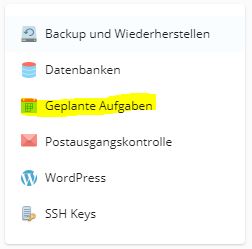
Cronjobs ("Scheduled tasks") in Plesk
Cronjobs („Scheduled tasks“) in Plesk

To automate the updates, we need a so-called cronjob (in Plesk it is called„Scheduled Tasks“ in German and is located under Websites & Domains in the right side menu) with which we run WP-CLI on our WordPress installation. Cronjobs can be used to execute time-controlled commands or call URLs. A mail notification can also be set up for each call or in the event of an error. The following explanations refer to a Linux hosting which is found in > 99% of the case with most. If you are one of the few who have Windows hosting, the steps need to be adjusted a bit.

In order to use WP-CLI, we need to install it first. For this purpose we download it and place WP-CLI in our own web hosting or server. The package contains the executable file „wp“. It should now be placed in the file system in the web hosting (use either FTP, SFTP or the file manager of the hosting panel for this purpose). For the file to actually execute, it needs an execute right. To do this, use the file manager or FTP program to set the execution rights (see e.g. Plesk doc). Now we are ready to create the planned task.
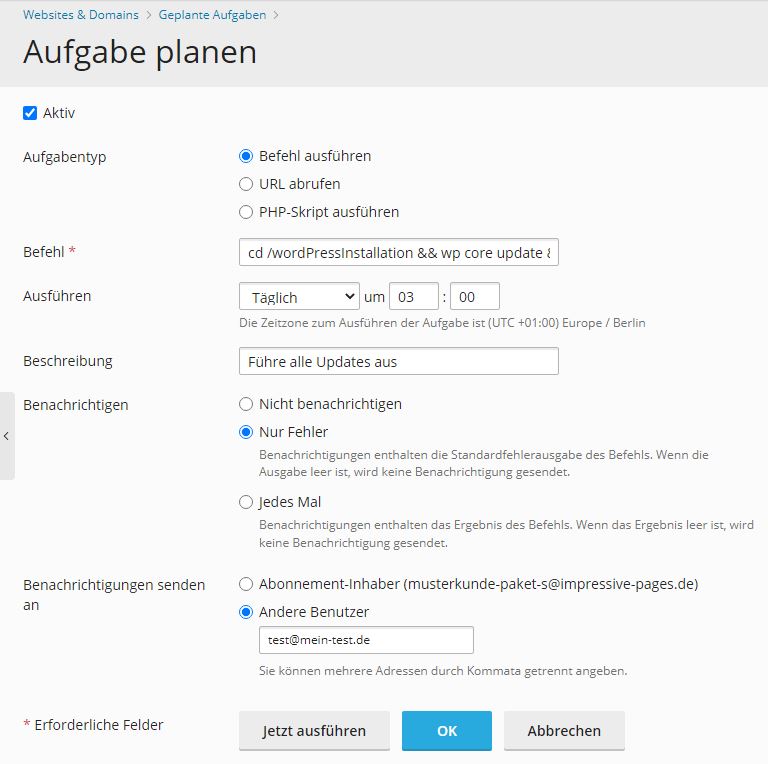
Create scheduled tasks in Plesk

In Linux commandline shells, where the execution of cronjobs takes place, there is a possibility to chain commands. With && commands are concatenated and executed in order from left to right (e.g. Command1 && Command2 –MyParameter etc.). You can also use the & operator instead of &&. Then the following commands will be executed only if the previous command has been executed successfully. But in this case it does not make a big difference for our automatic updates which operator we use.

So that really everything is updated incl. of the translation files we use the following command:

cd /wordPressInstallation && wp core update && wp plugin update --all && wp theme update --all && wp language core update && wp language plugin update --all && wp language theme update --all

First we change with cd /wordPressInstallation to the WordPress installation directory (often the WordPress installation is located under /httpdocs). If there are multiple WordPress instances, a scheduled task can be created for each site and the steps are repeated for each appearance. After that, wp core update triggers the update (or update check) of WordPress itself and wp plugin update –all and wp theme update –all start the update of all plugins and themes. Here you can also restrict for which plugins/themes the updates should be made or which should be ignored.

The most interesting point is the wp language command. This can be used to update the said translation files. Accordingly, this can be done for Core (WordPress itself), plugins and themes.

In order to use wp as a command, the path to the directory where the wp executable file is located must be contained in the so-called PATH variable. To do this, add the following line to the .profile file (create file if necessary) in the root directory of the hosting:

PATH=/mybin:$PATH

/mybin must be replaced accordingly with the path where wp is located. Alternatively, the absolute path in the cronjobs can be used instead of wp, e.g. /mybin/wp core update. Then the extension of the PATH variable is not necessary.

Update WP-CLI regularly

In order for WP-CLI to always be up-to-date and thus compatible with the current WordPress version, it must also be updated regularly. The clever with the following command.

wp cli update

For this purpose, we also create a scheduled task. I run it in my customer hostings 1x a month. This is perfectly sufficient for the update frequency of WP-CLI.
Kategorie: development, Web hosting, WordPress

WordPress 5.9 „Groundbreaking Release“ will be available at the end of January 2022

22. Dezember 2021

WordPress 5.9

The latest version of the WordPress CMS is expected to be released in January 2022. WordPress.org writes about this:„WordPress 5.9 will be the third major release in 2021 and will focus on blocks and intrinsic web design, navigation menus, an interface for theme.json, refinement of block theme editing workflows, additional design tools and a new default theme. In addition, it is possible that the release will also include pattern insertion and creation, unzip/rollback failover, PHP unit testing, and improved compatibility with PHP 8.0 and 8.1.“ (Source: Translation from https://make.wordpress.org/core/5-9/)

In fact, it will not be released until early 2022, but the main work on WordPress 5.9 should be completed this year. WordPress has released an introduction video on Youtube:

Introducing WordPress 5.9

Das Video wird von YouTube eingebettet und erst beim Klick auf den Play-Button von dort geladen und abgespielt. Ab dann gelten die Datenschutzerklärungen von Google.
Presentation of WordPress 5.9 on Youtube

The „rollback failsafes“ feature is particularly worth mentioning. This should allow WordPress to restore the previously installed version after theme or plugin updates have failed. This will surely be a great relief for many users and makes WordPress even more robust and secure. It is not surprising that the community is waiting with anticipation for the release.

What features does WordPress 5.9 bring with it?

  • Blocks and intrinsic web design
  • Navigation menus
  • Interface for theme.json
  • Optimization of editing processes for block themes
  • New default theme
  • Additional design tools
  • Insert and create templates
  • Unzip/Rollback failsafe
  • PHP unit tests
  • Improved compatibility with PHP 8.0 and 8.1

New default theme with WordPress 5.9

The version promises improved navigation and design control, as well as easier access to various patterns. This makes it easy to change the appearance of the website without having to change the theme. The appearance of a website is determined in WordPress via themes and it is also possible to develop individual designs.

It was recently announced that a new theme called Twenty Twenty-Two will be part of WordPress 5.9. This is supposed to be the most flexible default theme for WordPress yet.

Publication date

WordPress 5.9 is scheduled for release on January 25, 2022.

Kategorie: development, WordPress

Visually separate sub-categories of products in WooCommerce – separate ‚ul‘ lists

22. Dezember 2021

Separate subcategories of products visually in WooCommerce

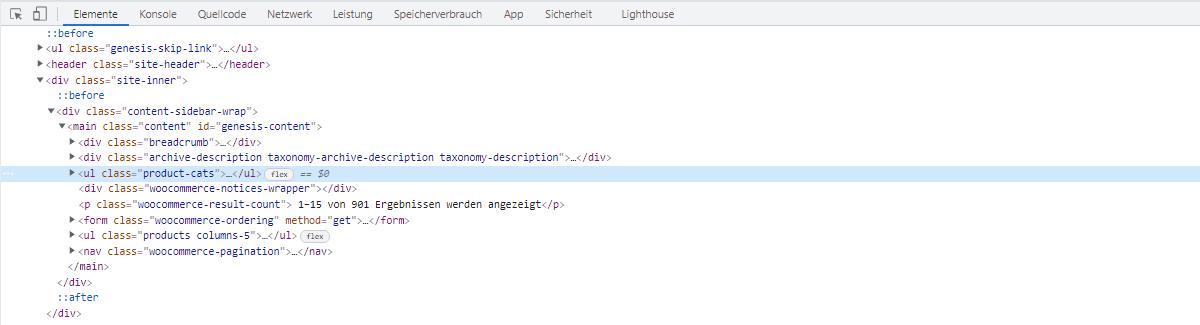
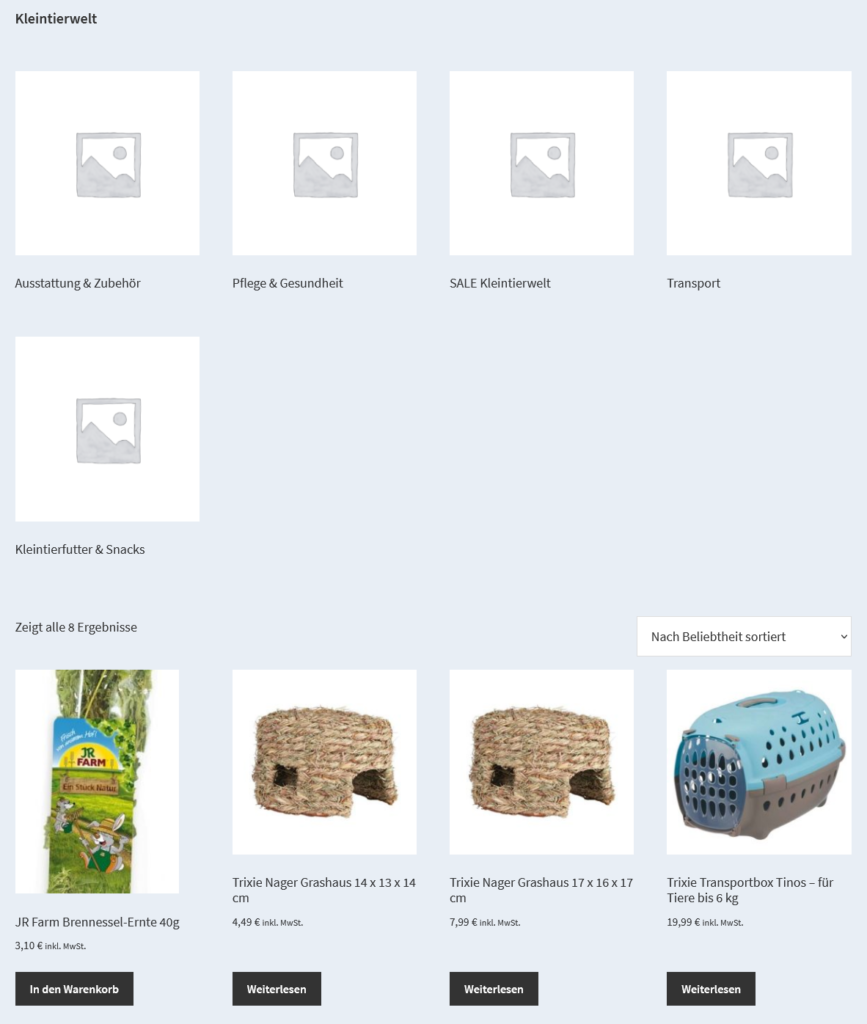
In WooCommerce, the category archive page displays or hides the subcategories in front of the products by default, depending on the configuration. However, it is not possible to display the listing separately. If we want to separate the display and have two separate listings, it is possible to use the following code.

/**
* Move WooCommerce subcategory list items into their own <ul> separate from the product <ul>.
*/
add_action( 'init', 'iphf_move_subcat_list' );
function iphf_move_subcat_list() {
	// Remove the subcat <li>s from the old location.
	remove_filter( 'woocommerce_product_loop_start', 'woocommerce_maybe_show_product_subcategories' );
	add_action( 'woocommerce_before_shop_loop', 'iphf_product_loop_start', 1 );
	add_action( 'woocommerce_before_shop_loop', 'iphf_maybe_show_product_subcategories', 2 );
	add_action( 'woocommerce_before_shop_loop', 'iphf_product_loop_end', 3 );
}
/**
 * Conditonally start the product loop with a <ul> contaner if subcats exist.
 */
function iphf_product_loop_start() {
	$subcategories = woocommerce_maybe_show_product_subcategories();
	if ( $subcategories ) {
		woocommerce_product_loop_start();
	}
}
/**
 * Print the subcat <li>s in our new location.
 */
function iphf_maybe_show_product_subcategories() {
	echo woocommerce_maybe_show_product_subcategories();
}
/**
 * Conditonally end the product loop with a </ul> if subcats exist.
 */
function iphf_product_loop_end() {
	$subcategories = woocommerce_maybe_show_product_subcategories();
	if ( $subcategories ) {
		woocommerce_product_loop_end();
	}
}

This is how it looks in the frontend:

Move WooCommerce subcategory list items into their own separate from the product

Thus, we are able to style the subcategories accordingly and display them as filters, for example. This allows customers to better select products from the catalog.

Thanks to twoelevenjay

Kategorie: WooCommerce, WordPress

Regenerate thumbnails in WordPress via WP-CLI

22. Dezember 2021

Sometimes it is necessary to regenerate thumbnails or the images in smaller resolutions. This is necessary, for example, if you have changed the resolution values for the step sizes under Settings -> Media.

There are a number of plugins that will do this for you e.g. Regenerate Thumbnails. However, if you don’t want to install a plugin for it, there is an easy way via WP-CLI.

With the following command we initiate the regeneration:

wp media regenerate

Now you have to confirm with yes via the console. To anticipate the question, there is the –yes parameter for that:

wp media regenerate ­­--yes

That’s it! Now we can watch the progress in the console edition. By the way, WP-CLI can be wonderfully used in our hosting packages. Copy WP-CLI to it, log in via SSH and use WP-CLI.

With WP-CLI many tasks can be automated e.g. scheduled updates or backups. Feel free to contact me, I will be happy to support you.

Kategorie: development, WordPress

Remove the number of products in the category list from the category name

22. Dezember 2021

Number of products in category list by category name
add_filter( 'woocommerce_subcategory_count_html', 'remove_category_products_count_in_category_list' );
function remove_category_products_count_in_category_list() {
  return;
}

Kategorie: WooCommerce, WordPress

Activate reviews for all products in WooCommerce (bulk)

22. Dezember 2021

Activate ratings for all products programmatically with the following code:

add_action('admin_init', 'cwhf_enable_reviews');

function cwhf_enable_reviews() {

    $args = array(
        'post_type'   => 'product',
        'numberposts' => -1,
        'comment_status' => 'closed',
        'post_status' => 'publish',
    );

    $shop_products = get_posts( $args );
    foreach( $shop_products as $item){
        $product = new WC_Product($item->ID);
        wp_update_post( array(
            'ID'    => $item->ID,
            'comment_status' => 'open',
        ) );
    }
}

Paste this code into functions.php or use it as a plugin and open the admin panel once. This activates ratings (reviews) for all products. Afterwards, the code should be removed again. This is only necessary once.

In order for ratings to be automatically enabled for new products, a checkmark must be placed next to„Allow visitors to comment on new posts“ under Settings -> Discussion.

You have more questions about WooCommerce or need support? We will be happy to help you. Get a quote to help you with your WooCommerce store.

Kategorie: WooCommerce

  • « Go to Previous Page
  • Seite 1
  • Interim pages omitted …
  • Seite 9
  • Seite 10
  • Seite 11
  • Seite 12
  • Seite 13
  • Interim pages omitted …
  • Seite 16
  • Go to Next Page »

Haupt-Sidebar

  • How to remove dashicons in WordPress frontend?
  • How do I create a website (homepage) with ChatGPT?
  • Can I create a website (homepage) with ChatGPT?
  • iOS restrictions re: bringing up the keyboard on programmatic focus
  • iOS restrictions re: bringing up the keyboard on programmatic focus
  • Remove user listing from WP-JSON
  • Benutzerauflistung aus WP-JSON entfernen
  • What does „Video is not the main content of the page“ mean?
  • Was hat es mit „Das Video ist nicht der Hauptinhalt der Seite“ auf sich?
  • Remove WordPress logo from toolbar
  • Efficient onboarding simplified: LearnSuite – the cloud application for digital onboarding
  • Wir stellen vor: LearnSuite – Die Cloudanwendung für digitales Onboarding
  • Howto: How do I create a website (homepage) with ChatGPT?
  • Howto: Wie erstelle ich mit ChatGPT eine Website (Homepage)?
  • Can I create a website (homepage) with ChatGPT?
  • Kann ich mit ChatGPT eine Website (Homepage) erstellen?
  • Set noindex nofollow via .htaccess HTTP header
  • Über .htaccess X-Robots-Tag noindex nofollow setzen
  • How to remove WordPress Dashicons in frontend?
  • Wie lassen sich Dashicons im WordPress-Frontend entfernen?
  • DSGVO (3)
  • GDPR (3)
  • Genesis Framework (10)
  • Genesis-Framework (9)
  • Google Search Console (4)
  • Google Search Console (4)
  • Linux (3)
  • Linux (3)
  • mobile (3)
  • Mobile (3)
  • Network (1)
  • Netzwerk (1)
  • SEO (5)
  • SEO (5)
  • Trends (3)
  • Trends (4)
  • Uncategorized (3)
  • Web development (1)
  • Web hosting (1)
  • Webentwicklung (1)
  • Webhosting (1)
  • WooCommerce (9)
  • WooCommerce (9)
  • WordPress (23)
  • WordPress (24)

Footer

Logo


© 2026 CITROWEB
  • Datenschutz
  • Impressum