
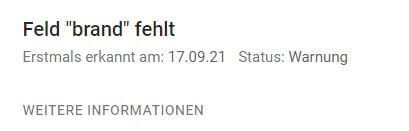
If you run a store with WooCommerce, you have surely already discovered the adjacent message in Google Search Console under Improvements -> Products.
Standardmäßig fügt das WooCommerce-Plugin für WordPress das „Brand“-Schema nicht zu WooCommerce Produktseiten hinzu. Das bedeutet, dass es eine Lücke im WooCommerce-Schema gibt.
On various support threads on WordPress.org and Github it says this can be solved by purchasing a WooCommerce plugin. With something as basic as this, you can rightly get very frustrated.
Ultimately, WooCommerce’s justification is that these are not essential parts of Schema – they only generate warnings in Google Search Console, but not errors. So, theoretically, they are not a big deal.
However, if you want to close this gap, you have several options. There are „scheme plugins“ that will help you patch this up – the Yoast SEO WooCommerce plugin fills in the gaps for you – but it’s a bit overkill to spend around 70 euros a year on it. Unless you have or need it for some other important reason. Then this guide will help.
Many people avoid code-based solutions because they need to be „maintained“ and break regularly. So for an e-commerce website that you make money with, that’s not so great!
Code to fix Google Search Console – warning for „brand“ field
The Code Snippets plugin allows you to integrate small code snippets like the following into the page. Professionals have a separate plugin for such customizations or use the functions.php of their theme.
/*
* Füge "Brand"-Schema in die Strukturierten Daten ein
*/
function custom_woocommerce_structured_data_product ($data) {
	global $product;
	$data['brand'] = ['@type' => 'Brand', 'name' => 'Meine Marke'];
	return $data;
}
add_filter( 'woocommerce_structured_data_product', 'custom_woocommerce_structured_data_product' );
If you are the manufacturer of your products or if you only carry goods of one brand, you can insert your brand here instead of„My brand“ (quotation marks must remain).
Alternatively, the brand can be read from the brand property using $product->get_attribute(‚pa_brand‘).
The code snippet would look like this:
/*
* Füge "Brand"-Schema in die Strukturierten Daten ein
*/
function custom_woocommerce_structured_data_product ($data) {
	global $product;
        $data['brand'] = ['@type' => 'Brand', 'name' => $product->get_attribute('pa_brand') ?? null];
	return $data;
}
add_filter( 'woocommerce_structured_data_product', 'custom_woocommerce_structured_data_product' );
I use a product property Manufacturer with a customer. Therefore, I set the „Brand“ field with the manufacturer using the $product->get_attribute(‚pa_manufacturer‘) command.
To test success, use Google’s handy online tool: Test Structured Data.