
• Zur Hauptnavigation springen
  • Skip to main content
  • Zur Hauptsidebar springen
  • Zur Fußzeile springen
Logo

CITROWEB Webdesign

Erste Wahl für Ihren Onlineauftritt

  • Home
  • Leistungen
    • Webdesign, Webentwicklung und Beratung
    • Online-Shops mit WooCommerce
    • Technische Unterstützung für WooCommerce-Shops
    • Suchmaschinenmarketing
      • SEO: Ihr Webauftritt erhält mehr relevante Besucher
      • SEA: Suchmaschinenwerbung für Ihren Webauftritt
    • Webhosting
  • Blog
  • Kontakt aufnehmen
Home » Blog » Fix: Items can not be removed from WooCommerce shopping cart (NGINX or W3 Total Cache).

Fix: Items can not be removed from WooCommerce shopping cart (NGINX or W3 Total Cache).

3. September 2022

On a client’s WooCommerce store, we noticed it was not possible to remove items from the shopping cart. When clicking on „Remove item“ the shopping cart was reloaded and there was no change.

It can have various causes. Often, it is a misconfigured caching. But that was not the case here. That was my first guess as well. However, nginx was in use here and the configuration used in the server did not look as recommended by WordPress (https://wordpress.org/documentation/article/nginx/) or nginx itself (https://www.nginx.com/resources/wiki/start/topics/recipes/wordpress/).

Solution if it is an nginx error

The location / section of the vhost must look like this:

location / {
   try_files $uri $uri/ /index.php?$args;
}

In the case of the customer, ?$args was missing from the section. When making changes to the nginx configuration, do not forget a service reload. Under Ubuntu, run the following:

systemctl reload nginx

Solution: It is a caching problem with W3 Total Cache

If the caching plugin W3 Total Cache is used in the WordPress installation, it is necessary to configure the plugin so that the shopping cart or checkout pages are not cached. Otherwise, it may cause problems.

Under W3 Total Cache -> Page Cache -> Never cache the following pages insert the following entries:
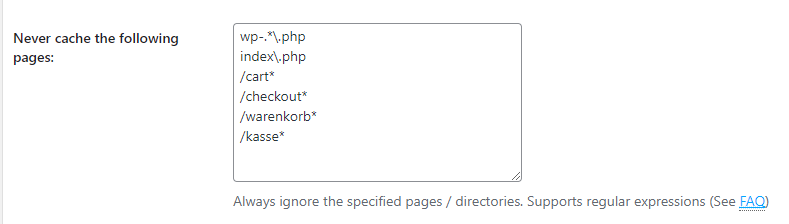
"Never cache the following pages" at W3 Total Cache

Here again the values to copy out:

/cart*
/checkout*

or

/warenkorb*
/kasse*

depending on whether the German or English version of WooCommerce is in use.

Kategorie: development, WooCommerce

Haupt-Sidebar

  • How to remove dashicons in WordPress frontend?
  • How do I create a website (homepage) with ChatGPT?
  • Can I create a website (homepage) with ChatGPT?
  • iOS restrictions re: bringing up the keyboard on programmatic focus
  • iOS restrictions re: bringing up the keyboard on programmatic focus
  • Remove user listing from WP-JSON
  • Benutzerauflistung aus WP-JSON entfernen
  • What does „Video is not the main content of the page“ mean?
  • Was hat es mit „Das Video ist nicht der Hauptinhalt der Seite“ auf sich?
  • Remove WordPress logo from toolbar
  • Efficient onboarding simplified: LearnSuite – the cloud application for digital onboarding
  • Wir stellen vor: LearnSuite – Die Cloudanwendung für digitales Onboarding
  • Howto: How do I create a website (homepage) with ChatGPT?
  • Howto: Wie erstelle ich mit ChatGPT eine Website (Homepage)?
  • Can I create a website (homepage) with ChatGPT?
  • Kann ich mit ChatGPT eine Website (Homepage) erstellen?
  • Set noindex nofollow via .htaccess HTTP header
  • Über .htaccess X-Robots-Tag noindex nofollow setzen
  • How to remove WordPress Dashicons in frontend?
  • Wie lassen sich Dashicons im WordPress-Frontend entfernen?
  • DSGVO (3)
  • GDPR (3)
  • Genesis Framework (10)
  • Genesis-Framework (9)
  • Google Search Console (4)
  • Google Search Console (4)
  • Linux (3)
  • Linux (3)
  • mobile (3)
  • Mobile (3)
  • Network (1)
  • Netzwerk (1)
  • SEO (5)
  • SEO (5)
  • Trends (3)
  • Trends (4)
  • Uncategorized (3)
  • Web development (1)
  • Web hosting (1)
  • Webentwicklung (1)
  • Webhosting (1)
  • WooCommerce (9)
  • WooCommerce (9)
  • WordPress (24)
  • WordPress (23)

Footer

Logo


© 2026 CITROWEB
  • Datenschutz
  • Impressum