

• Zur Hauptnavigation springen
  • Skip to main content
  • Zur Hauptsidebar springen
  • Zur Fußzeile springen
Logo

CITROWEB Webdesign

Erste Wahl für Ihren Onlineauftritt

  • Home
  • Leistungen
    • Webdesign, Webentwicklung und Beratung
    • Online-Shops mit WooCommerce
    • Technische Unterstützung für WooCommerce-Shops
    • Suchmaschinenmarketing
      • SEO: Ihr Webauftritt erhält mehr relevante Besucher
      • SEA: Suchmaschinenwerbung für Ihren Webauftritt
    • Webhosting
  • Blog
  • Kontakt aufnehmen
Home » Blog » WooCommerce product page without tabs, but everything below each other

WooCommerce product page without tabs, but everything below each other

22. Dezember 2021

It is about these tabs that are displayed on the product page

To remove the tabs (description, additional information and ratings) on the product page in WooCommerce or to place all information below each other we use the following short code snippet.

By default, WooCommerce displays separate tabs for Description, Additional Information and Reviews on the product page. Sometimes it makes sense to do without tabs for usability reasons. Amazon and other big store also show the content below each other instead of in tabs. The approach comes from the mobile sector and we have become very accustomed to it by now. It’s not wrong to take a cue from the big ones, as they’ve often already put a lot into optimizing their presences and potential visitors have already gotten used to it.

function woocommerce_output_product_data_tabs() {
	$product_tabs = apply_filters( 'woocommerce_product_tabs', array() );
	
	if ( empty( $product_tabs ) ) return;
	
	echo '<div class="woocommerce-tabs wc-tabs-wrapper">';
	foreach ( $product_tabs as $key => $product_tab ) {
		echo '<div id="tab-' . esc_attr( $key ) . '">';
		if ( isset( $product_tab['callback'] ) ) {
			call_user_func( $product_tab['callback'], $key, $product_tab );
		}
		echo '</div>';
	}
	echo '</div>';
}
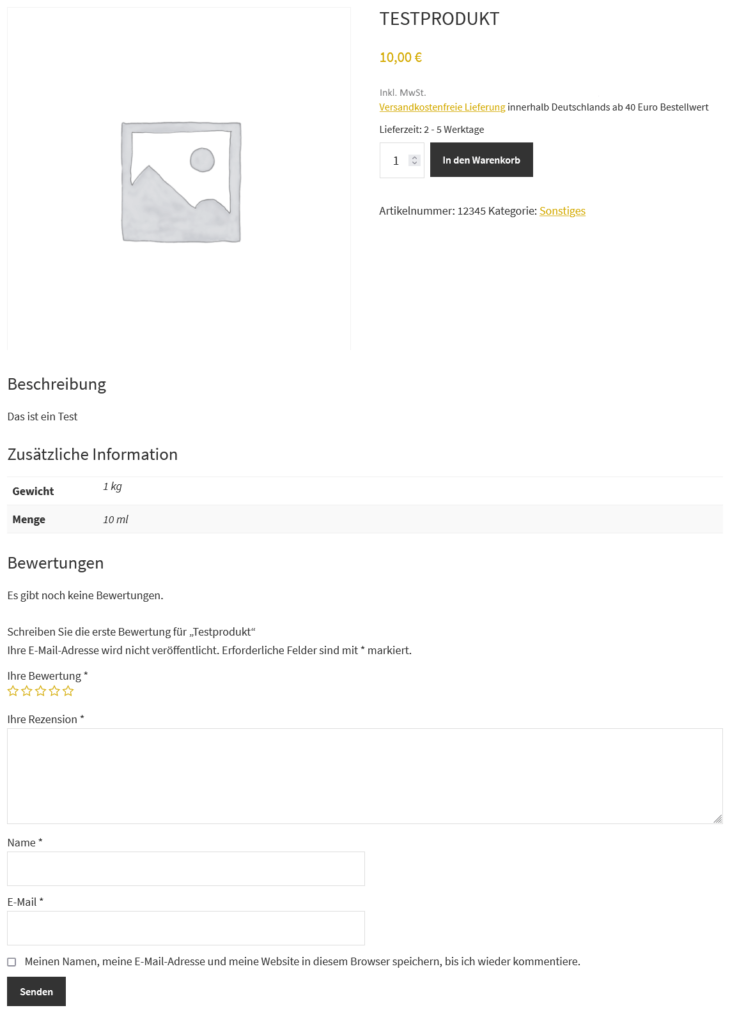
Tabs on the product page in Woocommerce among themselves

As seen here in the example, all information is below each other and the tab bar (as shown above) is not visible.

This provides the visitor with an overview of all information at a glance.

Which do you like better with tabs or one below the other?

Alternative solution

Alternatively, there is still this solution at gist.github.com. This has the disadvantage that the empty DIVs are displayed anyway, even if there is no content. Of course, this can be solved in the code. With the above solution, tab content is only included when it is available.

Kategorie: development, WordPress

Haupt-Sidebar

  • How to remove dashicons in WordPress frontend?
  • How do I create a website (homepage) with ChatGPT?
  • Can I create a website (homepage) with ChatGPT?
  • iOS restrictions re: bringing up the keyboard on programmatic focus
  • iOS restrictions re: bringing up the keyboard on programmatic focus
  • Remove user listing from WP-JSON
  • Benutzerauflistung aus WP-JSON entfernen
  • What does „Video is not the main content of the page“ mean?
  • Was hat es mit „Das Video ist nicht der Hauptinhalt der Seite“ auf sich?
  • Remove WordPress logo from toolbar
  • Efficient onboarding simplified: LearnSuite – the cloud application for digital onboarding
  • Wir stellen vor: LearnSuite – Die Cloudanwendung für digitales Onboarding
  • Howto: How do I create a website (homepage) with ChatGPT?
  • Howto: Wie erstelle ich mit ChatGPT eine Website (Homepage)?
  • Can I create a website (homepage) with ChatGPT?
  • Kann ich mit ChatGPT eine Website (Homepage) erstellen?
  • Set noindex nofollow via .htaccess HTTP header
  • Über .htaccess X-Robots-Tag noindex nofollow setzen
  • How to remove WordPress Dashicons in frontend?
  • Wie lassen sich Dashicons im WordPress-Frontend entfernen?
  • DSGVO (3)
  • GDPR (3)
  • Genesis Framework (10)
  • Genesis-Framework (9)
  • Google Search Console (4)
  • Google Search Console (4)
  • Linux (3)
  • Linux (3)
  • mobile (3)
  • Mobile (3)
  • Network (1)
  • Netzwerk (1)
  • SEO (5)
  • SEO (5)
  • Trends (3)
  • Trends (4)
  • Uncategorized (3)
  • Web development (1)
  • Web hosting (1)
  • Webentwicklung (1)
  • Webhosting (1)
  • WooCommerce (9)
  • WooCommerce (9)
  • WordPress (23)
  • WordPress (24)

Footer

Logo


© 2026 CITROWEB
  • Datenschutz
  • Impressum