
With the help of YOAST it is possible to display the product description as a meta description. This is done via the programmatic route as follows:
Insert the following code as a snippet in functions.php of the theme or using a plugin.
// callback für Ersetzung in YOAST SEO
function get_fullDescription() {
    global $post;
    return $post != null ? $post->post_content : "";
}

// Registriere eigene YOAST-Variablenersetzung
function register_custom_yoast_variables() {
    wpseo_register_var_replacement( '%%fulldes%%', 'get_fullDescription', 'advanced', 'Full Description' );
}

// YOAST-Variablenersetzung bekannt machen
add_action('wpseo_register_extra_replacements', 'register_custom_yoast_variables');
After that, go to WordPress -> SEO -> Display in search results -> Products %%fulldes%% under Meta description. Do not forget to save!
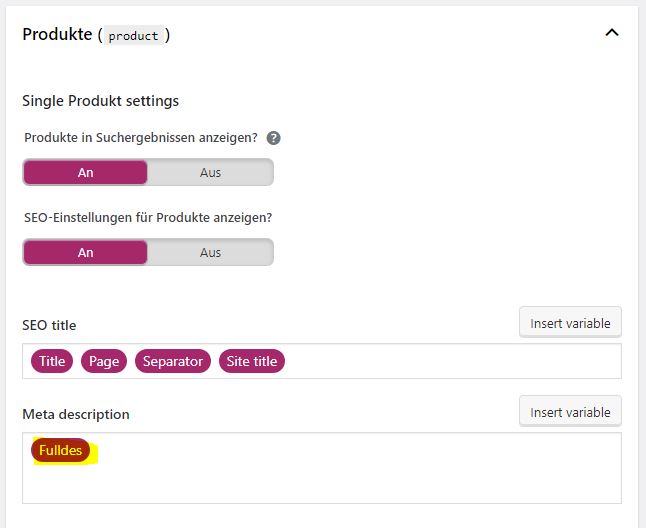
But now the complete description is used. However, it would be nicer to consider the length specification for meta descriptions of the search engines. This is a maximum of 160 characters.
For this we need two more functions. We use the replaceHtmlTags function below to replace any existing HTML tags in the description, because we don’t want them in our meta description. With the second function wordTruncate we reach the length specification. The code ensures that it is not simply separated after 160 characters and thus possibly cut off in the middle of the word, but it is cut off after the last word that is still within the 160 characters.
function replaceHtmlTags($string) {
	return preg_replace("/<.*?>/", "", $string);
}

function wordTruncate($string, $desired_max_width) {
  $parts = preg_split('/([\s\n\r]+)/u', $string, -1, PREG_SPLIT_DELIM_CAPTURE);
  $parts_count = count($parts);

  $length = 0;
  $last_part = 0;
  for (; $last_part < $parts_count; ++$last_part) {
    $length += strlen($parts[$last_part]);
    if ($length > $desired_max_width) { break; }
  }

  return implode(array_slice($parts, 0, $last_part));
}
The routine get_fullDescription from the code above is modified again and looks like this:
// callback für Ersetzung in YOAST SEO
function get_fullDescription() {
    global $post;
    return wordTruncate(replaceHtmlTags($post->post_content), 160);
}
The complete code thus looks like this:
// callback für Ersetzung in YOAST SEO
function get_fullDescription() {
    global $post;
    return wordTruncate(replaceHtmlTags($post->post_content), 160);
}

// Registriere eigene YOAST-Variablenersetzung
function register_custom_yoast_variables() {
    wpseo_register_var_replacement( '%%fulldes%%', 'get_fullDescription', 'advanced', 'Full Description' );
}

// YOAST-Variablenersetzung bekannt machen
add_action('wpseo_register_extra_replacements', 'register_custom_yoast_variables');

function replaceHtmlTags($string) {
	return preg_replace("/<.*?>/", "", $string);
}

function wordTruncate($string, $desired_max_width) {
  $parts = preg_split('/([\s\n\r]+)/u', $string, -1, PREG_SPLIT_DELIM_CAPTURE);
  $parts_count = count($parts);

  $length = 0;
  $last_part = 0;
  for (; $last_part < $parts_count; ++$last_part) {
    $length += strlen($parts[$last_part]);
    if ($length > $desired_max_width) { break; }
  }

  return implode(array_slice($parts, 0, $last_part));
}
Thus, without the paid YOAST SEO WooCommerce extension, we have achieved to display the product description as meta description.
WooCommerce short description as meta description
If, on the other hand, you want to use the short description as a meta description, YOAST SEO offers the function in the free version, albeit somewhat hidden.
>> In order to use the short description as a meta description we enter the variable %%wc_shortdesc%% variable.
Good luck with your SEO project!
Do you have any further questions or do you need support, I will be happy to assist you. Write me without any obligation or call me.